





51883FD7A1004489B26FF8245B2BD974.jpg)







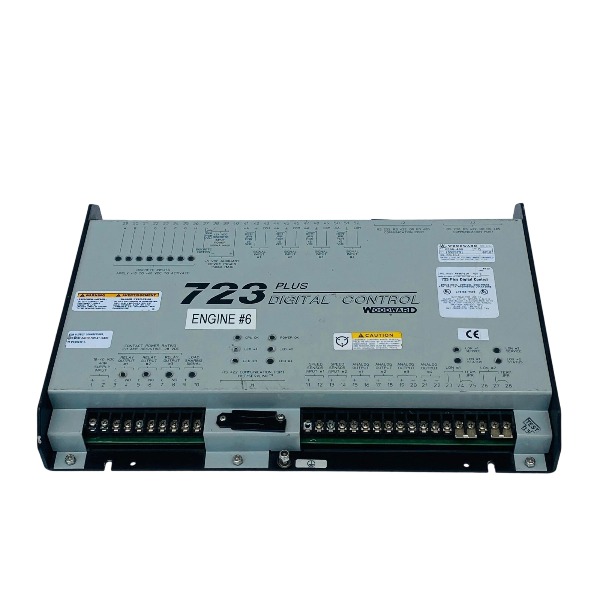
Description
-
Brandwoodward
-
Model9906-619
-
Product Name723PLUS Digital Governor Control
-
Place of OriginUnited States
-
Customs HS Code85371011
-
Power Supply18 V DC to 40 V DC
-
Dimensions315 mm × 211 mm × 49 mm
-
Weight1.75 kg
-
Operating Temperature-20℃ to +70℃
-
Storage Temperature-40℃ to +85℃
-
Warranty12 month
-
Product Statusnew and original
Commissioning Procedure for Woodward 9906-619 (723PLUS Low Voltage Digital Governor)
Required tools: 24 VDC stabilized power supply, 9907-205 handheld programmer, Watch Window / Servlink PC software, digital multimeter, oscilloscope, lockout-tagout equipment, approved wiring drawings, magnetic pickup (MPU) and fuel actuator
Pre-commissioning Safety & Visual Inspection
Carry out lockout-tagout procedures for engine or turbine fuel supply, starting circuits and high-voltage auxiliary power. Confirm the controller part number is 9906-619, the 723PLUS low-voltage governor. Inspect the unit for physical damage, loose terminals and damaged connector pins. Check the actuator mechanical linkage to ensure smooth movement without jamming. Verify the MPU mounting clearance, which should be maintained between 0.25 mm and 1.25 mm from the sensor tip to the gear tooth. Inspect cable shielding and confirm signal cables are routed separately from high-current power conductors. Measure insulation resistance between all signal terminals and the chassis to eliminate unexpected short circuits or earth faults.
Wiring Verification
Cross-reference every wiring connection with the approved schematic, including 24 VDC power supply, dual redundant MPU speed inputs, 4–20 mA analog I/O channels, discrete digital inputs for ESD, start commands and breaker status feedback, discrete outputs and actuator drive circuits. Validate the polarity and terminal termination of the LON load-sharing bus and Modbus RS485 lines. Confirm the hardwired ESD emergency shutdown circuit is implemented with fail-safe logic.
Power-on and Basic Hardware Check
Remove lockout-tagout only for the controller’s 24 VDC power, while the engine fuel and starting circuits remain isolated. Energize the controller and observe the status indicator LEDs. Establish communication via the RS232 port using either the handheld programmer or Watch Window PC software. Confirm a stable communication link and check for active critical hardware alarms. Record the controller firmware revision and back up the factory default parameters.
Offline Configuration (Configure Mode, Engine Must Be Shut Down)
Access Configure Mode through the handheld programmer or PC software. Load the corresponding GAP application program tailored to the specific engine-generator package. Configure core engine parameters including gear tooth count, rated speed, overspeed trip threshold, operating speed range and actuator minimum/maximum drive current. Set analog input scaling ranges, assign functions to discrete inputs and define relay output logic. Configure the LON node address, Modbus slave address, baud rate and signal mapping table. Select the governing mode between droop and isochronous, and define start fuel limits as well as fuel limiting profiles. Store the completed configuration into non-volatile memory and export the parameter file for project archiving.
Signal Calibration Test
Power the controller alone without rotating the prime mover. Inject 4–20 mA reference signals to analog inputs and verify measurement accuracy. Force discrete input status to validate feedback response. Perform full-stroke actuator testing by commanding minimum and maximum output values to confirm smooth travel without dead zone or saturation. Crank the engine using the starter motor to verify valid MPU signals; check for stable speed readings on the diagnostic screen and validate the dual speed input redundancy function.
Interlock and Protection Logic Test
Simulate ESD trigger conditions, overspeed events, loss-of-speed signals and external trip commands. Confirm the actuator immediately moves to its fail-safe position. Verify relay outputs for alarm, trip and breaker control functions. For multi-generator parallel configurations, test LON load-sharing communication, including network reset routines and communication fault alarming.
Crank and Starting Commissioning
Release lockout-tagout for the starting circuit while preparing the fuel system for controlled startup. Perform the crank test. Monitor the speed ramp profile, start fuel limit and acceleration rate. Fine-tune start fuel values and acceleration PID gains to prevent overfueling or engine stall. Confirm stable speed regulation at idle condition.
On-speed Dynamic Tuning (Service Mode)
Bring the unit up to rated speed under no-load conditions. Tune proportional, integral and derivative gains to optimize speed regulation performance. Evaluate governor response during load rejection and load ramp tests, and adjust dynamic settings to minimize speed deviation. Switch between isochronous and droop modes to confirm seamless mode transition. For paralleled generators, activate LON load sharing, test load balance across units and adjust load-sharing parameters as required.
Functional Load Test
Close the generator circuit breaker and conduct staged loading tests. Continuously monitor speed stability, fuel actuator response, exhaust temperature and all diagnostic alarms. Validate remote setpoint adjustment through Modbus or analog remote signals. Execute the overspeed trip test under controlled conditions only after obtaining the site safety permit.
Final Documentation and Handover
Save the finalized parameter set and event/alarm logs. Clear active faults and alarm history. Restore all jumpers and wiring to match the as-built drawings. Remove test instruments and temporary test wiring. Deliver the configuration file, tuning report, proof test certificate and alarm list to the site team. Provide operational training for local staff covering handheld programmer operation and fault troubleshooting.

Programming Woodward 9906-619 (723PLUS) Using 9907-205 Handheld Programmer
Required items: 9907-205 handheld programmer, 9906-619 controller, 24 VDC control power supply, approved wiring drawings, lockout-tagout tools
Preparatory Safety Check
Apply lockout-tagout to the engine fuel supply, starter circuit and high-power auxiliary circuits. Confirm the controller model is 9906-619, the 723PLUS digital governor. Inspect the J1 RS422 communication port on the controller, remove the protective cover and verify the jumper is set for handheld programmer communication mode. The handheld programmer is powered directly from the controller through the J1 port and does not require an external power adapter.
Hardware Connection
Insert the 9907-205 securely into the 9-pin J1 connector of the 9906-619 controller. Energize the 24 VDC control power for the controller. The programmer will automatically execute a self-test routine upon power-up. Once self-test finishes, the 4-line LCD screen displays default application data. Press the ID key to check the controller firmware part number and revision. If the screen goes blank, press the ESC key to refresh the display.
Menu Introduction
The handheld programmer features two primary menu groups: Service Menu and Configure Menu.
Service Menu: Accessible while the engine is in operation. It supports real-time data monitoring, PID parameter tuning, setpoint modification and alarm status review.
Configure Menu: Restricted for use only when the engine is shut down. It is used for complete parameter programming, I/O function assignment and application configuration. A valid password is required to unlock the Configure Menu.
Online Monitoring via Service Menu
Scroll through monitoring variables with the Up and Down arrow keys, including engine speed, actuator output value, MPU speed signal, 4–20 mA analog readings, discrete input states and active fault alarms.
Tuning operation: Select PID gains, speed setpoint, droop setting and fuel limit parameters. Use the turtle keys for fine adjustment and rabbit keys for rapid adjustment. Type in precise numerical values via the numeric keypad and press Enter to confirm.
Enter Configure Mode for Offline Programming (Engine Must Be Stopped)
Enter the authorized Woodward configuration password to unlock the Configure Menu. Load or edit the corresponding GAP application parameters customized for the prime mover.
Configure critical parameters: gear tooth count, rated speed, overspeed trip threshold, minimum and maximum actuator drive current, analog input scaling, discrete input function mapping including ESD, start command and breaker status feedback, relay output definition, Modbus slave address, baud rate, LON load-sharing node address and communication signal mapping.
Select the governing mode between isochronous and droop, and configure start fuel limits as well as acceleration profiles.
Parameter Saving
After modifying configuration settings, press the SAVE key to store parameters into the controller’s non-volatile EEPROM memory. Always save changes before cycling controller power; any unsaved configurations will be discarded after power loss.
Signal and Logic Verification
Switch back to the Service Menu to force discrete input signals and validate the corresponding output responses. Run full-stroke tests for the actuator and verify readings from the dual redundant MPU speed channels. Simulate ESD shutdown and overspeed trip conditions to confirm the actuator moves to its fail-safe position. Check LON and Modbus communication health if the unit operates in a parallel generator system.
On-site Dynamic Tuning (Service Menu, Unit On-Speed)
Remove lockout-tagout protection for the starting circuit and crank the unit up to rated speed under no-load conditions. Adjust proportional, integral and derivative gains directly from the programmer. Carry out load ramp and load rejection tests to optimize speed deviation performance. Toggle between isochronous and droop control modes to confirm smooth mode switching. For multi-generator parallel arrangements, fine-tune parameters to achieve balanced load sharing among units.
Fault Diagnostics and Exit
Retrieve active alarms and historical fault records on the programmer. Clear fault logs once troubleshooting is completed. Exit menus in the proper sequence. The handheld programmer supports hot disconnection without disrupting normal controller operation. Document the final parameter settings and archive them for project records.

1751-6058
5852-1062
8406-113
SPM-D11
9907-205
8237-1369
8237-1597
8404-1004
TG-13
9907-1183



.jpg)







