C8DDE972370D46B091FA0A939FBF94CC.jpg)
.jpg)
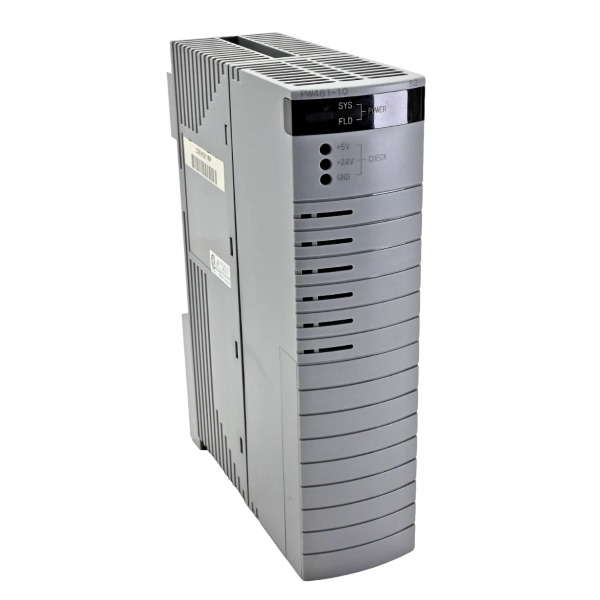







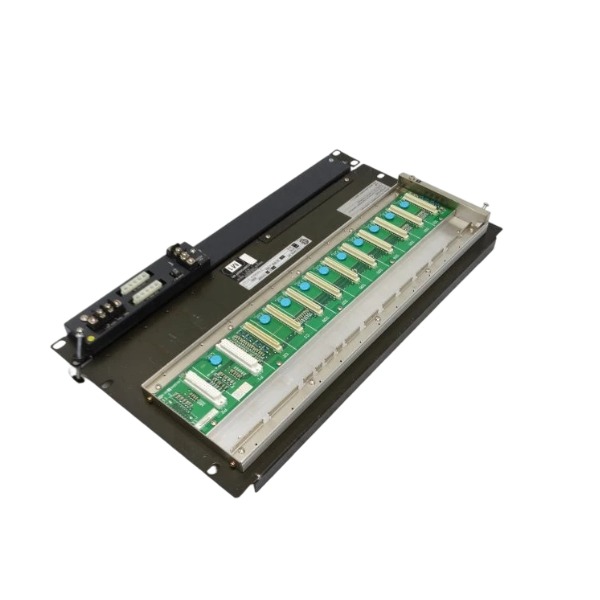
Description
-
BrandYOKOGAWA
-
ModelPW481-10
-
Product NameAC Input Power Supply Module for CENTUM VP DCS
-
Place of OriginJapan
-
Customs HS Code8537101190
-
Power Supply100‑120 V AC, 50/60 Hz
-
Dimensions152 mm × 51 mm × 203 mm
-
Weight1.0 kg
-
Operating Temperature0 ℃ ~ +55 ℃
-
Storage Temperature‑20 ℃ ~ +70 ℃
-
Warranty12 month
-
Product Statusoriginal
YOKOGAWA PW481-10 Electrical Parameters, Supported Systems, Software & Protocols
Voltage & Current
AC Input Voltage: 100–120 V AC (±10%), 50/60 Hz
Max Input Apparent Power: 200 VA
DC Output (Rack Backplane): 24 V DC, maximum output current 2.5 A
Integrated protection mechanisms: overvoltage protection, overcurrent protection and short-circuit protection
Cooling method: natural convection cooling
Supported Hardware Systems
Applicable for Yokogawa CENTUM VP DCS Field Control Unit (FCU) racks
Compatible with CENTUM VP FIO remote node units (ANB10 series) and optical ESB bus repeater units
Supports both single power module operation and dual redundant power supply configuration in one rack
Compatible Software
CENTUM VP Engineering Software: realizes hardware configuration, parameter setup, module self-diagnosis and alarm monitoring functions
CENTUM VP Operator Station Software: displays real-time operating status and fault alarms of the power module
All diagnostic functions are inherently integrated in the CENTUM VP system, with no additional standalone PC software required for the PW481-10 module
Communication & Bus Protocols
The PW481-10 is not equipped with external user communication ports. All status and diagnostic data is transmitted via the rack backplane:
ESB Bus: Uploads module operating status, health information and power supply fault alarms to the CPU module through the backplane ESB bus.
Vnet/IP: The CPU forwards all power module diagnostic data and alarm information to engineering stations and operator stations via Vnet/IP network.
This module does not directly support Modbus, HART or any other fieldbus protocols, functioning exclusively as a dedicated power supply unit for CENTUM VP rack hardware.

YOKOGAWA PW481-10 Commissioning Steps
The PW481-10 serves as an AC-input power supply module for the Yokogawa CENTUM VP FCS rack. It converts alternating-current input into stabilized direct-current power for the rack backplane and delivers power to CPU, communication and I/O modules.
1. Pre-commissioning Inspection (Power-off Condition)
Perform visual inspection on the module for mechanical damage, cracks, burn traces or loose connectors, and verify that the module model complies with project specifications.
Check whether the rack slot assignment is correct; ensure the rack backplane is free of deformation, contamination and pin damage.
Inspect protective earthing of the cabinet: reliable connection shall be established between the module housing, rack and protective ground.
Validate specifications of the external AC power source: PW481-10 accepts 100-240 V AC input. Confirm that ratings of external circuit breaker and fuse satisfy technical requirements.
Ensure all rack-mounted modules (CPU, I/O, coupler) are fully seated without loose installation.
For dual redundant PW481-10 deployment, make certain the two power supply modules are fitted in their dedicated slots respectively.
2. Module Installation
Maintain the external AC circuit breaker in OFF position.
Slide the PW481-10 along rack guide rails into its designated power slot, and push it firmly until the gold-finger connector makes full contact with the backplane.
Tighten the front-panel locking screw to achieve stable mechanical and electrical connection.
Wire the AC input cable to module terminals strictly per wiring drawings and fasten terminal screws securely. Strictly avoid mis-connection of live wire, neutral wire and protective ground.
3. No-load Power-on Test
Temporarily remove other functional modules including CPU and I/O units, leaving only PW481-10 installed inside the rack.
Close the external AC circuit breaker to apply AC power to PW481-10.
Observe front-panel LED indicators: the Power OK LED shall illuminate steady green, while the alarm/fault LED remains extinguished.
Measure DC output voltage on the backplane with a multimeter to confirm readings are within allowable tolerance.
Check module surface temperature; no abnormal overheating, buzzing or other unusual noise shall occur.
If the fault LED turns red, cut off AC power supply without delay. Troubleshoot input voltage, wiring, earthing status and backplane condition. Do not proceed to subsequent steps until faults are fully resolved.

4. On-load Commissioning
Switch off AC input power again. Reinstall CPU module, ESB coupler and all I/O modules into corresponding rack slots and secure each front-panel screw.
Switch on AC power. PW481-10 provides regulated DC power to the fully-loaded rack backplane.
Keep monitoring LED status of PW481-10: the green normal indicator stays steadily on with no fault alarm triggered.
Re-measure backplane DC output voltage under full rack load to validate voltage stability; significant voltage drop is not permitted.
Check power-up status of all remaining rack modules. CPU, communication and I/O hardware shall boot normally without any power-related fault alarms.
5. Redundancy Function Test (for Dual PW481-10 Redundant Configuration)
Keep both PW481-10 modules energized and in healthy operating status with the rack running under full load.
Manually cut off AC input for one power module. Verify that the remaining PW481-10 seamlessly takes over the complete rack load, and rack hardware, CPU as well as I/O modules keep continuous operation without reset or service interruption.
Monitor DCS engineering station and operator station; no power-supply-relevant system alarms or control loop dropout shall appear.
Restore AC power to the previously de-energized PW481-10. Confirm the unit automatically returns to normal operation, and the power pair resumes dual-feed redundant mode.
Repeat above-mentioned procedures for the other module to complete mutual switch-over validation.
6. DCS System Diagnostic Verification
Log into the CENTUM VP engineering station and navigate to the hardware diagnostic interface.
Confirm PW481-10 is displayed as “Normal” with no hardware fault codes or power-supply alarms reported.
Document practical AC input voltage, backplane DC output voltage and module operating temperature as baseline commissioning records.
7. Post-commissioning Confirmation
Execute power-on / power-off cycle test: cut off total cabinet power then restore supply, and verify consistent normal startup performance of PW481-10.
Maintain good cabinet ventilation and guarantee unobstructed airflow around the heat-dissipation zone of PW481-10.
Complete commissioning documentation and mark the equipment as qualified.

UKB-3-35E
MFT-06
H1111.0204
HC-RFS353K
85UVF1‑1CEX
SH31004P12A2000
PW482‑50 S2
PW484-50 S1
AAR181-S50 S2
AAI143-H50 S1
85UVF1-1QD
CCM10


.jpg)