






Description
-
BrandROLLS-ROYCE
-
ModelDC0033A
-
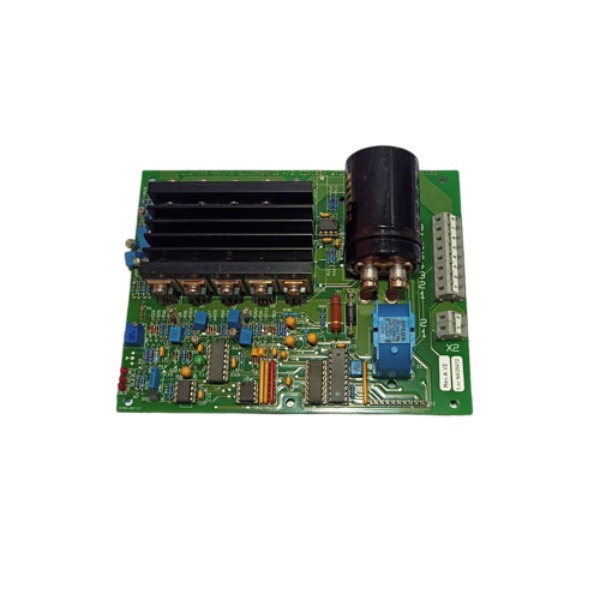
Product NameStepper Motor Driver PCB Module
-
Place of OriginNorway
-
Customs HS Code8542319000
-
Power Supply0 to 24 V DC
-
Dimensions220 mm × 145 mm × 30 mm
-
Weight0.41 kg
-
Operating Temperature-10 °C to 70 °C
-
Storage Temperature-40 °C to 85 °C
-
Warranty12 month
-
Product Statusoriginal
Rolls-Royce DC0033A Operation Guide
1. Pre-Operation Safety & Preparation
Perform lockout and tagout procedures to fully de-energize all related power circuits prior to installation, inspection, and maintenance work. Wear an anti-static wrist strap to prevent ESD damage to internal electronic components. Confirm the unit is a genuine Rolls-Royce DC0033A module and verify full compatibility with the marine control system backplane. Thoroughly inspect the module housing, backplane connectors, and wiring terminals for physical damage, corrosion, bent pins, and dust contamination. Prepare calibrated torque tools, certified copper wires, and official supporting configuration software. Ensure the on-site operating environment meets standard requirements for humidity, vibration, and airborne contaminants.
2. Mechanical Installation
Align the DC0033A edge connector precisely with the backplane card guides. Insert the module smoothly into the designated slot until it fully locks and firmly engages with the backplane. Secure both upper and bottom locking latches completely. Do not apply brute force during installation; stop operation and realign the module if abnormal resistance occurs. The module communicates with the main control system through the built-in backplane bus, requiring no additional external wiring for system data transmission.
3. Grounding & Power Wiring
Connect the module chassis grounding terminal to the low-resistance instrument ground bus using short, heavy-duty copper wire and fasten the terminal tightly. Strictly follow standard DC polarity to avoid reverse power connection. Strip wire insulation to the proper length, fully insert wire cores into terminals, and ensure no bare copper strands are exposed. Torque all terminals to factory specified values. Separate DC power cables from high-voltage AC cables, analog signal cables, and communication cables to minimize electromagnetic interference and signal disturbance.
4. Pre-Power-On Inspection
Confirm the DC0033A module is fully seated and securely latched in the backplane slot. Verify solid grounding connection and correct DC input polarity. Inspect all wiring for short circuits, open circuits, and loose wire strands. Check backplane bus connection integrity and ensure firmware versions of all matched system modules are compatible. Confirm cable routing and separation comply with standard industrial wiring specifications.
5. Power-Up & Initial Commissioning
Gradually restore DC power to the system. Observe front-panel status LEDs; a steady green LED indicates successful power-on self-test and normal module standby status. Launch the official Rolls-Royce configuration software to verify the DC0033A is correctly identified on the backplane bus. Import and download the approved project configuration and parameter settings to the module. Verify backplane communication stability, analog/digital signal collection, and output response accuracy. Eliminate all configuration mismatches and communication faults before activating automatic control functions.
6. Normal Operating Modes
Local Manual Mode: Allows on-site manual operation of field equipment for system debugging, testing, and local commissioning.
Automatic Control Mode: The module runs pre-programmed control logic and executes automatic regulation based on real-time process feedback signals.
Remote Supervisory Mode: Receives remote setpoints and control commands from the bridge or central HMI, and uploads real-time equipment status, alarms, and diagnostic data. Mode switching is only permitted under confirmed safe process conditions.
7. Fault Monitoring & Alarm Handling
Continuously monitor front-panel LED indicators and system diagnostic logs. Common faults include power failure, backplane bus timeout, signal overrange, configuration checksum error, and internal hardware malfunction. For communication faults, inspect module seating status and backplane bus termination. For configuration errors, re-download verified and complete project files. Isolate and de-energize the module immediately if permanent hardware failure is confirmed.
8. Hot-Swap & Module Replacement
The DC0033A supports hot-swap operation in certified redundant Rolls-Royce marine control systems. Confirm the redundant controller has fully taken over system control before removing the faulty module. Release the upper and bottom latches, then pull out the module smoothly. Install the new DC0033A module in reverse steps and fully lock the latches. Wait for automatic system recognition, download matched configuration parameters, and verify communication and control performance before restoring full system redundancy.
9. Post-Operation Maintenance
Keep the module ventilation area clean and unobstructed to ensure normal heat dissipation. Regularly check wiring terminals for loose torque and re-tighten as needed. Store spare modules in anti-static packaging at all times. Do not disassemble or modify internal components arbitrarily. Record module slot number, firmware version, and configuration revision for daily maintenance and equipment traceability.

How to Update the Firmware of Rolls-Royce DC0033A Module
1. Pre-Upgrade Safety and Preparation
Apply lockout-tagout measures to relevant process circuits. For redundant control architectures, validate that the standby module can seamlessly assume control to prevent process disruption. Wear an anti-static wrist strap to protect circuitry from electrostatic discharge. Acquire the official DC0033A firmware package compatible with the module, together with the proprietary Rolls-Royce configuration software. Confirm cross-compatibility of the target firmware revision with the backplane hardware and other associated system modules. Back up the current module configuration and diagnostic logs prior to commencement. Prepare an industrial Ethernet cable to establish communication between the engineering workstation and the control backplane.
2. Verify Current Firmware Version
Power the DC0033A module and establish connectivity through the backplane bus. Launch the Rolls-Royce configuration utility, navigate to the target DC0033A module, and retrieve the active firmware version from its diagnostic interface. Determine whether an upgrade or downgrade is necessary, and check if transitional intermediate firmware versions are mandatory.
3. Enter Firmware Upgrade Mode
Leave the module energized and fully seated within the backplane. Navigate to the module maintenance menu in the software and activate the firmware upgrade function. When regular communication cannot be established, set the hardware DIP switches to place the module into boot loader mode. Under boot loader state, the module solely accepts firmware images and pauses standard control operations.
4. Execute Firmware Download
Choose the validated firmware file within the engineering software and start the download sequence. Preserve stable Ethernet and backplane communication throughout the transfer. Never remove power, disconnect cabling, or reset the module while flashing is underway. The front-panel LED flashes to signal ongoing data reception and memory programming.
5. Post-Flash Self-Test and Version Validation
Once programming finishes, the module reboots automatically and executes the power-on self-test. Inspect the status LED; a steady green light signifies a successful self-test. Re-establish communication using the configuration software and recheck the firmware version to confirm alignment with the intended release. Restore the previously backed-up configuration to the module.
6. Function Test and Return to Service
Validate backplane communication, signal sampling and output response after configuration restoration. Perform commissioning checks on control logic and alarm routines. For redundant systems, test automatic switchover between primary and standby controllers. The module may only be returned to normal control operation once all functions behave as expected.
7. Troubleshooting for Failed Upgrade
If post-download verification fails, rerun the flashing process using a known-good firmware file. If the module remains stuck in boot loader mode after multiple retries, inspect backplane connectors, power supply quality and cable condition. Continuous boot failure may point to physical flash chip damage, which requires module replacement. Document the firmware revision, execution time and test outcomes for maintenance archives.

UKB-3-35E
MFT-06
H1111.0204
HC-RFS353K
85UVF1‑1CEX


.jpg)

.jpg)