.jpg)







Description
-
BrandAMAT
-
Model0010-23716
-
Product NameSemiconductor Equipment Spare Component
-
Place of OriginUnited States
-
Customs HS Code84869000
-
Power Supply0.12A
-
Dimensions115mm × 90mm × 45mm
-
Weight0.32kg
-
Operating Temperature10°C to +50°C
-
Storage Temperature-20°C to +60°C
-
Warranty1 year
-
Product Statusnew
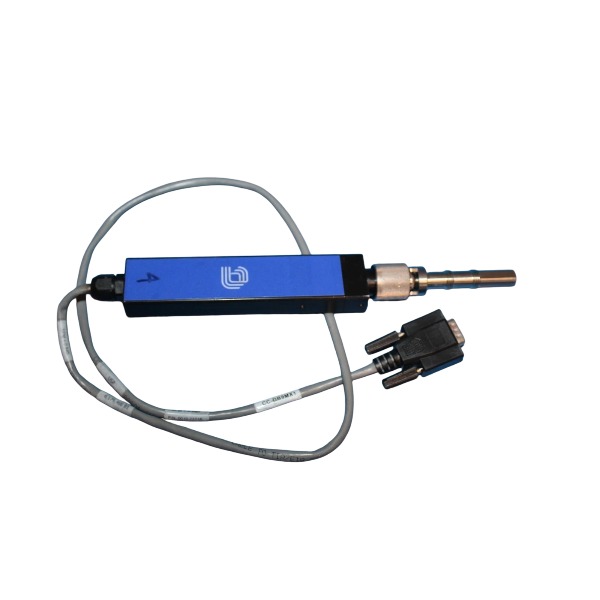
AMAT 0010-23716 PMAX Pyrometer / Emissometer Probe Assembly Wiring Method
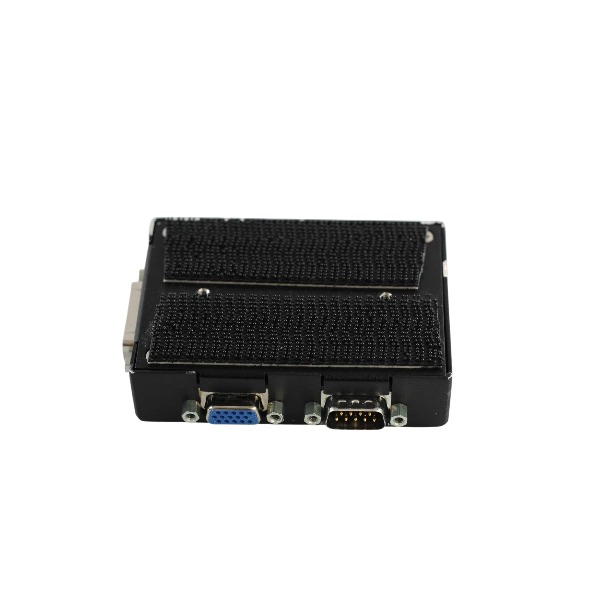
Connector Type: 25-pin high-density D-Sub connector.
Power Wiring: Route 10–50 VDC supply from the controller’s dedicated output terminals to the corresponding probe pins. Twisted and shielded cable is required for power circuits. The cable shield shall be grounded at the controller end only, while the shield at the probe end remains floating to eliminate ground-loop interference.
Signal Wiring: Analog temperature and emissivity feedback signals are transmitted over dedicated differential pairs within the 25-pin D-Sub. Separate these signal cables from high-power AC wiring to mitigate plasma and electromagnetic interference.
Communication Wiring: Serial diagnostic signals are carried on reserved D-Sub pins. The probe exchanges status data and alarms with the host process controller using the proprietary AMAT protocol and SECS/GEM interface.
Ground Wiring: The metallic probe housing is bonded to chamber protective earth through its mounting hardware. Signal ground and power ground must be isolated and not tied together.
Wiring Precautions: Apply ESD controls before starting wiring work. Verify power polarity prior to energization to prevent reverse-voltage damage. Tighten the D-Sub thumbscrews to the specified torque to maintain reliable contact under vibration. Always refer to the platform-specific pin assignment in the AMAT service manual for Centura and Endura tools.

AMAT 0010-23716 PMAX Pyrometer / Emissometer Probe Assembly Installation Guide
1. Scope
This guide describes mechanical mounting, electrical wiring, optical alignment, leak testing, commissioning and post-installation verification for the AMAT 0010-23716 PMAX pyrometer and emissometer probe assembly. It applies to Centura and Endura semiconductor process platforms.
2. Pre-Installation Safety & Preparation
Shut down the process chamber and the matched PMAX controller, then perform lockout and tagout of all energy sources. Fully vent the chamber and allow it to cool to a safe working temperature.
Carry out all work inside a Class 100 cleanroom. Wear a grounded ESD wrist strap, cleanroom gloves and a cleanroom gown to prevent electrostatic damage and particle contamination.
Inspect the probe assembly for surface scratches, lens contamination, housing cracks and damage to the 25-pin high-density D-Sub connector. Confirm the part number matches the BOM and record the probe serial number.
Prepare shielded twisted-pair cable, contact cleaner, calibrated torque wrench, optical alignment tool, helium leak detector and AMAT PMAX service diagnostic software.
3. Mechanical Mounting
Carefully remove the existing probe and avoid direct contact with the optical window.
Install the new probe into the designated bulkhead port of the chamber. Fit the O-ring and ensure the sealing interface is free of particles and process residues.
Align the optical path toward the wafer measurement area and guarantee an unobstructed line of sight. Maintain the viewing angle within 30 degrees normal to the wafer surface to minimize emissivity measurement deviation.
Tighten mounting fasteners to the OEM specified torque value. Over-torque is forbidden, as it may deform the vacuum seal or probe housing.
If optical purge is configured for the probe, connect the purge gas fitting and set an appropriate low purge flow rate to reduce film deposition on the lens.
4. Electrical Wiring
Lay the 25-pin D-Sub shielded twisted cable separately from high-voltage RF and AC power cables to reduce plasma electromagnetic interference.
Supply regulated 10–50 VDC power to the corresponding power pins and strictly follow polarity requirements to avoid component damage caused by reverse voltage.
Wire differential analog pairs for temperature and emissivity feedback signals to the PMAX controller, and connect serial diagnostic pins for host communication.
The cable shield shall be single-point grounded at the controller end only; the shield at the probe end shall remain floating to prevent ground loops.
Fasten D-Sub thumbscrews to the required torque to resist vibration. Do not stretch, squeeze or pinch the cable during routing.
Bond the probe metal housing to the chamber protective earth through mounting hardware. Signal ground and power ground must be kept isolated.
5. Alignment & Optical Check
Power up the PMAX controller only after all mechanical assembly and wiring work is completed.
Activate the alignment laser or diagnostic optical view function via the PMAX service tool, and verify the laser spot falls within the target measurement region on the wafer.
Readjust the probe mounting position if the spot shifts to the wafer edge, shadow zone or fixture area.
Record the distance-to-spot ratio and save all alignment parameters into the chamber recipe file.
6. Vacuum Leak Test
Seal the chamber and pump it down to the target process vacuum level.
Conduct helium leak detection on the probe bulkhead feedthrough.
Re-seat the probe or retorque fasteners if the leak rate exceeds the platform acceptance limit. Repeat leak tests until vacuum integrity is verified.
7. Commissioning & Software Setup
Start the AMAT PMAX diagnostic software and confirm the probe is recognized by the host through the SECS/GEM interface.
Load the calibration file matched to the probe serial number, and complete on-site emissivity and temperature calibration in accordance with AMAT official procedures.
Configure measurement range, sampling rate and alarm thresholds for the active production recipe.
Execute a dry wafer test. Check that temperature and emissivity readings stay stable without intermittent signal dropout or noise spikes.
Verify fault and alarm signals can be transmitted normally to the chamber host controller.
8. Post-Installation Documentation & Acceptance
Record installation date, serial number, calibration data, leak test results and alignment offsets in the equipment maintenance log.
Run a short stabilization idle cycle before releasing the tool for mass production.
Do not touch the optical window with bare hands or unapproved tools during maintenance. Use only qualified cleanroom wipes and designated solvent for lens cleaning when necessary.



.jpg)