





5440BC86BD974C2DAF2145E90B3E8DB3.jpg)
.jpg)







Description
-
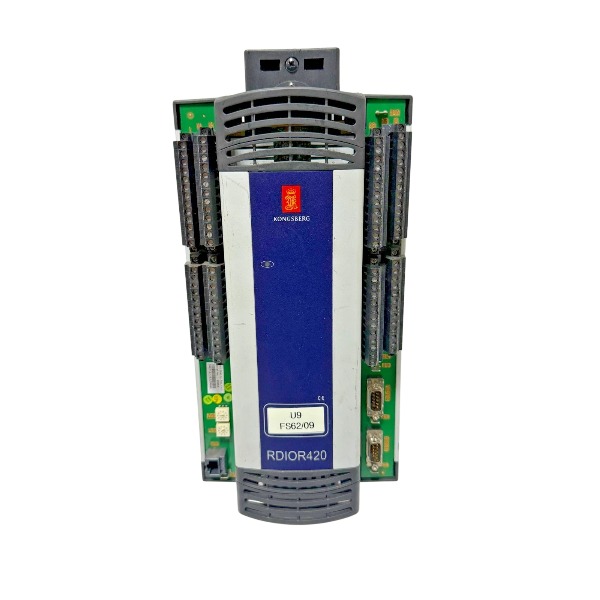
BrandKongsberg
-
ModelRDIOR420
-
Product NameRemote Digital Input/Output and Relay Module
-
Place of OriginNorway
-
Customs HS Code8537101190
-
Power Supply18 V DC to 31.2 V DC
-
Dimensions355 mm × 158 mm × 87 mm
-
Weight1.35 kg
-
Operating Temperature-15 °C to 70 °C
-
Storage Temperature-40 °C to 85 °C
-
Warranty1 year
-
Product Statusbrand new
Kongsberg RDIOR420 Application Cases
The RDIOR420 is a remote digital I/O and relay module designed for the Kongsberg K-Chief marine automation system. It features 16 configurable solid-state DI/DO channels plus 16 dedicated relay channels, and communicates with the main RCU controller over a redundant RBUS fieldbus.
Case 1: Engine Room Alarm and Monitoring System (AMS) -Cargo Vessel
Multiple RDIOR420 units are fitted into local engine room cabinets. Digital inputs acquire signals from bilge level switches, temperature and pressure alarm contacts, smoke fire detectors and equipment limit switches. Relay outputs energize local alarm beacons, sounders and remote alarm lamps. Redundant RBUS communication guarantees stable transmission of alarm data to bridge operator workstations. All outputs will revert to preset fail-safe states upon loss of bus communication.
Case 2: Vessel Power Management System (PMS) -Offshore Supply Vessel
DI channels of the RDIOR420 capture circuit breaker auxiliary feedback, generator running status and protection trip signals. Relay outputs deliver remote open/close commands for breakers and actuate generator auxiliary contactors. The module feeds generator status and trip events back to the central PMS controller, supporting load shedding and interlock logic for generator synchronization. Built-in short-circuit protection and line fault detection enhance performance in environments with heavy electromagnetic interference.
Case 3: Ballast Control System -Container Ship
Modules are mounted in distributed ballast control cabinets within cargo holds and pump rooms. Digital inputs receive valve limit feedback for ballast valves and operational status of ballast pumps. Relay channels send control signals to solenoid valves and pump motor starters. This distributed I/O architecture minimizes lengthy field cabling. All signals are transferred to the K-Chief main controller via redundant RBUS, allowing operators on the bridge to remotely monitor tank levels and manipulate ballast valves.
Case 4: Auxiliary Machinery Control -Platform Support Vessel
The RDIOR420 controls seawater cooling pumps, fresh water generators and sewage treatment plants. DI channels collect start-stop feedback and fault contacts from auxiliary equipment. Solid-state DO and relay channels drive local motor starters and status indicator lights. The module permits online channel configuration and continuous self-diagnostics; fault codes can be retrieved directly to facilitate on-site maintenance.
Case 5: Local Non-Safety Interlock -Offshore Drilling Unit Utility Skid
Paired with the K-Safe safety system, the RDIOR420 collects discrete interlock signals from utility equipment. Relay outputs handle non-safety interlock functions and status indication. Dual redundant RBUS eliminates single-point communication failure. If the link to the main controller is interrupted, the module activates preconfigured fail-safe outputs to lock associated equipment and prevent hazardous operation.

How to Configure DI/DO Channels of Kongsberg RDIOR420
1. Pre-Configuration Preparation
The RDIOR420 provides 16 solid-state channels configurable as either DI or DO, alongside 16 independent relay channels with NO/NC contact selection. Verify proper module mounting, stable 24 VDC supply, and complete wiring and termination for redundant RBUS A and B segments. Use the onboard DIP switches to set a unique node address and document this ID for software matching. Launch the Kongsberg K-Chief engineering configuration tool and back up the current system database prior to edits. Confirm field signal categories such as dry contacts and PNP/NPN types, and validate load limits for relay outputs.
2. Online Module Detection in Engineering Software
Start the Kongsberg configuration tool and establish a network connection to the RCU main controller. Perform an RBUS network scan to locate the RDIOR420 matching the configured node ID. Open the module editor and load the official RDIOR420 device profile. Check the module firmware version and confirm compatibility with the RCU firmware; execute a firmware upgrade if version mismatch exists.
3. Solid-State Channel Mode Configuration (DI / DO)
Navigate to the parameter page for the 16 solid-state channels and assign each channel as Digital Input (DI) or Digital Output (DO).
For DI setup: Define signal type, active logic level (high-active or low-active), enable line fault monitoring, and set debounce filtering time for contact-based signals. Line supervision identifies open-circuit and short-circuit faults on DI loops.
For DO setup: Activate short-circuit protection and specify the fail-safe state (hold or de-energized) triggered by RBUS communication failure. Solid-state DO channels support continuous loop diagnostics.

4. Relay Channel Parameter Setup
The 16 relay channels operate independently from the solid-state DI/DO group. Configure each relay contact as Normally Open (NO) or Normally Closed (NC). Define the fail-safe behavior of relay outputs when bus communication is interrupted. Link relay channels to control tags within the RCU logic. Observe relay contact power ratings to prevent overload damage.
5. Tag Assignment and Logic Linkage
Map each DI channel to a status tag inside the control database for alarm processing, interlock execution and bridge HMI visualization. Associate DO and relay channels with control logic outputs, setpoints and interlock commands originating from the RCU. Configure alarm triggers and diagnostic tags for channel faults such as cable breakage, short circuits and internal channel errors.
6. Configuration Download and Online Activation
Compile the updated configuration database and resolve any compilation errors. Download the configuration to the RCU and the target RDIOR420 module. The module supports online modification; updated channel parameters take effect without a full power reset after download. Monitor front-panel LEDs; a steady bus communication LED indicates a successful download.
7. Channel Commissioning and Function Test
Conduct point-by-point field verification: actuate DI contact sensors and confirm status updates within the engineering tool and HMI. Manually force DO and relay outputs via software to test actuators and indicator lamps. Validate line fault detection by simulating open and shorted field wiring. Simulate bus communication loss and confirm all outputs transition to the preconfigured fail-safe state.
8. Fault Troubleshooting and Configuration Archiving
When channel fault codes appear, inspect wiring polarity, loop supply, terminal connections and RBUS termination. Save the finalized configuration and update the system revision log, recording channel modes, fail-safe rules and tag assignments. Preserve test records for vessel commissioning and subsequent maintenance work.

MRU-E-JB1
DPS-110
382-079671
DPU RAi-16xe
RHUB200-5
RSER200-4
PS-11
MRU-D
RMP201-8 324400
RCU501


.jpg)







