Description
-
BrandHoneywell
-
Model05701-A-0121
-
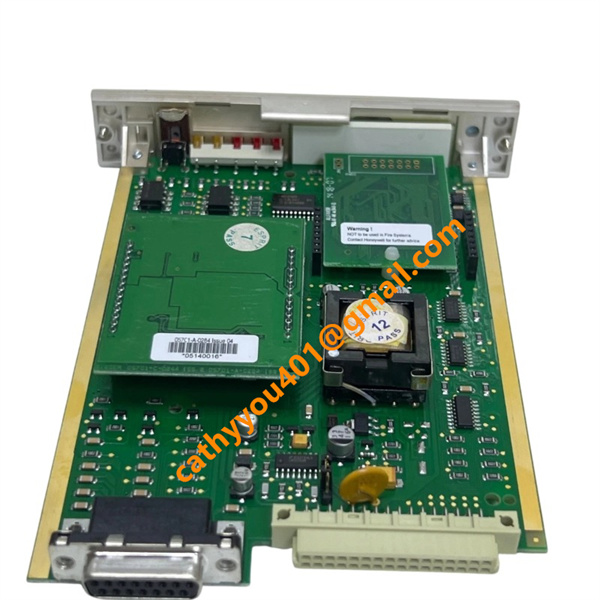
Product NameEngineering Interface Module for System 57 Gas Detection System
-
Place of OriginUnited States
-
HS Code8542319000
-
Dimensions142 mm × 98 mm × 32 mm
-
Weight0.21 kg
-
Operating Temperature0 °C ~ +60 °C
-
Storage Temperature-40 °C ~ +85 °C
-
Power Supply24VDC
-
Warranty12 MONTH
-
Product StatusNew and origianl
Backed by abundant in-stock inventory and nearly 20 years of industry experience, our company stands as a leading player in the industrial control sector.We offer an extensive range of industrial control products covering numerous models. Should you have any other requirements, please feel free to contact us, and we will respond to you promptly.
Our main brand:
1.ABB's module cards, touch screens, controllers, etc., such as PP846 touch screen, IGCT starting with 5SHY, PM starting controller, AI, DO starting input/output module, SP starting Bailey module, etc
2.GE's module card CPUs, such as VMIC starter, IS200, IS215, IS400, IS420 series, etc,
3.Emerson's card components and EPRO probes, Westinghouse 1C series, Honeywell CC series, Schneider 140 series, Envision full series, Bentley 3500 series, Rexroth motors and drives, and Foxboro small modules.
Power Input: This module draws operating power from the backplane of Honeywell System 57 rack assembly, with a nominal supply voltage of 24 VDC. Its typical power consumption remains below 5 W under normal continuous operating conditions.
Backplane Bus Input: It receives system-level commands, downloaded configuration parameters and real-time status information through the internal rack backplane interface, and communicates via the proprietary Honeywell System 57 bus protocol for intra-rack data interaction.
External Communication Input: The dedicated engineering interface port accepts incoming signals sent from the engineering workstation. This channel is utilized for downloading system configuration files, retrieving diagnostic event logs and receiving remote operational instructions for system commissioning and maintenance.
Status Input: Built-in internal monitoring logic continuously samples multiple status signals, including rack power supply health conditions, backplane bus communication quality, as well as self-diagnostic fault flags generated from module internal hardware circuits.
Communication Output: Via the external engineering interface port, the module transmits real-time system operating status, gas-detection measured values and comprehensive module diagnostic data toward the connected engineering workstation for data review and troubleshooting analysis.
Backplane Bus Output: Processed field measurement data, alarm trigger flags and module health diagnostic status are forwarded to other functional boards housed within the same System 57 rack through the backplane bus for cross-module data sharing and system-wide logic processing.
Indicator Output: On-board LED lamps deliver intuitive visual indication feedback covering power supply status, active communication link activity and hardware fault alarm states, facilitating rapid on-site inspection and local fault diagnosis by field technicians.

This unit functions as an engineering interface card for the Honeywell System 57 gas detection control rack. It is not fitted with wiring terminals for field sensors or actuators. All power delivery and signal exchange are completed through the rack backplane and the dedicated front-panel engineering communication port.
Rack Backplane Connection
Cut off the main power supply of the entire System 57 rack prior to any card installation activities. Align the 05701-A-0121 module with its assigned slot within the System 57 sub-rack. Slide the card steadily all the way inward until its gold-plated edge connector achieves secure and full contact with the rack backplane bus. Fasten the top and bottom retaining screws to secure the module firmly in position. Both 24 VDC operating power and inter-rack bus data signals are transferred via this backplane edge connector; no independent external power wiring is needed for this card.
Engineering Workstation Communication Port Wiring
Deploy the original matched communication cable kit intended for 05701-A-0121. Insert one end of the cable into the proprietary engineering interface port situated on the front face of the interface card. Attach the other cable terminal to the serial communication port of the engineering configuration workstation. This single communication cable serves as the sole physical link between the module and external PC hardware, supporting configuration file downloading, diagnostic log uploading, as well as remote operational command transmission.
Grounding Requirements
Make certain the System 57 rack cabinet is solidly bonded to protective earth ground through the dedicated earthing stud at the rear side of the rack. Adequate cabinet grounding helps restrain common-mode electrical noise and maintains consistent communication performance for the engineering interface card. This module has no dedicated terminals for field-signal shield termination. Shielding conductors from all field sensors shall be terminated on respective field interface cards inside the same rack cabinet instead of the 05701-A-0121 card.
Wiring Precautions
Never directly hook up field sensors, 4-20 mA transmitters or relay-controlled actuators to the 05701-A-0121 module. All field instrument wiring should be terminated on other peripheral field-interface cards housed within the System 57 chassis. Route the engineering communication cable with sufficient separation from high-voltage AC power cables to mitigate electromagnetic interference risks. All card insertion and wiring operations must be executed while the rack system remains fully de-energized.
Post-wiring Verification
Once all physical interconnections are completed, re-enable the main power supply for the rack. Observe and confirm normal status from the power-status LED and communication-activity LED located on the front panel of 05701-A-0121. Start the compatible engineering software and validate stable bidirectional communication between the workstation and System 57 rack prior to carrying out configuration download or system diagnostic procedures.

Frequently Asked Questions (FAQ)
1.How fast will you reply to my inquiry?
We process all inquiries efficiently and will respond promptly once we receive your message.
2.Do you carry large inventory of industrial control parts?
We maintain massive ready stock of mainstream automation spare parts to shorten lead times.
3.Can you source discontinued or obsolete PLC & DCS modules?
Absolutely.
We specialize in sourcing hard-to-find, obsolete and out-of-production industrial control components.
4.Do you inspect goods before shipment?
Every product undergoes thorough inspection before packing and dispatch.
5.Can you ship orders worldwide?
We provide global shipping with flexible logistics for urgent and regular orders.
6.What payment methods are available?
We accept multiple secure payment options. Please contact our sales team for detailed terms