.jpg)
.jpg)
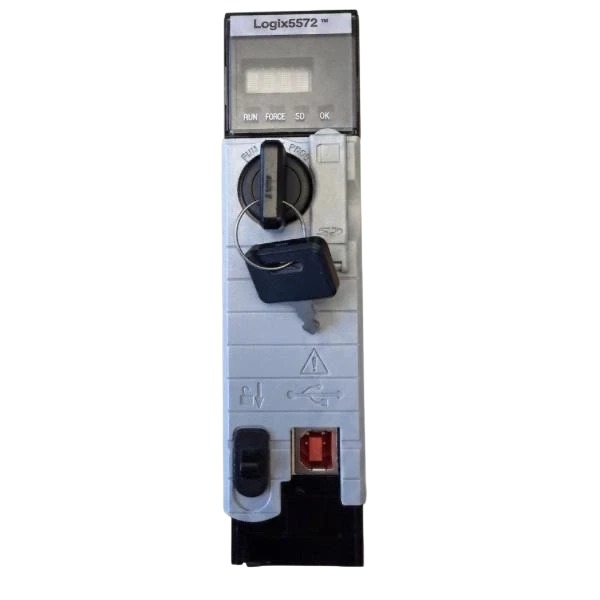







Description
-
BrandAllen-Bradley
-
Model1756-L72
-
Product NameControlLogix Logix5572 Processor Module
-
Place of OriginUnited States
-
Customs HS Code8537101190
-
Power Supply2.5 W
-
Dimensions158 mm × 53 mm × 186 mm
-
Weight0.25 kg
-
Operating Temperature0 °C to 60 °C
-
Storage Temperature-40 °C to 85 °C
-
Warranty12 month
-
Product Statusnew
1756-L72 Allen-Bradley ControlLogix Controller Power Wiring Steps (Official Standard)
1. Pre-Wiring Preparation & Safety Check
De-energize the entire ControlLogix chassis and power supply module prior to any wiring work. Confirm zero residual voltage within the power circuit to prevent electric shock and hardware damage. Prepare 75°C-rated solid or stranded copper conductors, with 14 AWG specified for power circuits, alongside a calibrated torque screwdriver. Confirm the mating power unit is the 1756-PB72 24VDC power supply, which covers the 19–32 VDC operating range of the 1756-L72 controller. Remove protective dust caps from the controller power connector and power supply terminals to maintain clean contact interfaces.
2. System Ground Connection (Priority Operation)
Carry out chassis grounding before connecting power to guarantee safety and noise immunity. Run a short, heavy-gauge copper conductor between the 1756-L72 chassis ground stud and the low-impedance system ground bus. Secure the ground termination tightly to reduce the risk of ground loops and stabilize the signal reference potential of the whole system.
3. Power Terminal Definition & Wiring Connection
Adhere to the defined DC polarity for the 1756-L72 controller and 1756-PB72 power supply; reverse polarity connection is strictly forbidden:
V+ Terminal (Positive): Connect to the positive high-side DC output terminal of the 1756-PB72 power supply
V-Terminal (Negative): Connect to the common negative low-side DC output terminal of the 1756-PB72 power supply
Strip insulation to a proper length, fully seat the wire conductor inside the power terminal, and make sure no bare copper is exposed and no wire strands are loose.
4. Terminal Fastening Specification
Torque all power terminal screws to the factory specification: 7 lb·in (0.79 N·m). For pluggable power connectors, push the connector home by hand until fully engaged and turn it an extra half turn for reliable locking. Do not over-torque, which can damage terminals and threads, or under-torque, which leads to loose contacts and overheating.
5. Post-Wiring Inspection & Power-On Verification
Inspect every power connection to verify correct polarity, tight termination, and absence of short or open circuits. Arrange cables in compliance with routing standards and segregate power wiring from signal and communication cables to minimize electromagnetic interference. Once inspection is finished, energize the system incrementally, monitor the controller power LED status, and confirm the 1756-L72 runs normally without alarms or fault codes.
6. Post-Disconnection Maintenance Regulation
Whenever power wiring is disconnected for maintenance or component replacement, refit and secure the dust cap onto the power connector promptly. This keeps dust, moisture and metallic particles out of the terminals to prevent bad contacts and short-circuit faults.

1756-L72 Allen-Bradley ControlLogix Controller Wiring Instructions
1. General Wiring Precautions
This document defines standard wiring procedures for the Allen-Bradley 1756-L72 ControlLogix controller. All installation and wiring activities must comply with NEC, NFPA 79, and local industrial electrical standards. Isolate and de-energize all power sources prior to wiring, installation, maintenance, or modification to prevent electric shock and permanent equipment damage. Only 75°C-rated copper conductors with proper wire gauge shall be used for all terminal connections. All terminal screws must be torqued to factory-specified values to ensure reliable electrical contact and prevent loose connections, overheating, and circuit failure. Separate power cables, low-level signal cables, and communication cables throughout cable routing to minimize electromagnetic interference and signal degradation.
2. Power Wiring Specifications
2.1 Power Supply Matching
The 1756-L72 controller requires a dedicated 1756-series power supply, typically the 1756-PB72 DC power supply. Direct connection to AC mains or unregulated power sources is prohibited without an approved industrial power supply module.
2.2 DC Power Wiring
Positive Terminal (+): Connect to the high-side DC output terminal of the 1756-PB72 power supply
Negative Terminal (–): Connect to the low-side/common DC output terminal of the 1756-PB72 power supply
Wire Specification: 14 AWG, 75°C-rated copper wire
Terminal Torque: 7 lb·in (0.79 N·m)
Strictly avoid reverse polarity connection. Confirm the supply voltage falls within the controller’s rated DC operating range before system power-up.
3. Ground Wiring (Critical)
3.1 Safety Chassis Ground
Connect the controller chassis ground stud to the system protective ground bus using a short, low-resistance copper conductor. Secure the connection with M4 or M5 fasteners fitted with flat or star washers. Keep ground wire length minimal to reduce ground resistance and eliminate potential leakage hazards.
3.2 Functional Ground
Perform full functional grounding on the controller chassis and mounting tabs to stabilize signal reference potential and suppress electromagnetic noise. Implement a unified system grounding structure to prevent ground loop formation.
4. Communication Port Wiring
4.1 EtherNet/IP Port Wiring
Cable Type: Industrial CAT5E UTP or STP twisted-pair Ethernet cable
Connector Type: 1585D–M4DC–H (unshielded) or 1585D–M4DC–SH (shielded)
Connector Torque: 9 lb·in (1 N·m)
For shielded Ethernet cables, terminate cable shield to chassis ground through the controller Ethernet bulkhead. Do not daisy-chain multiple grounded Ethernet devices with shielded cables to avoid ground loops.
4.2 USB Programming Port
Use a standard industrial USB cable to connect the front-panel USB port to a programming computer. This port is intended exclusively for temporary configuration, program upload/download, and on-site troubleshooting, and is not permitted for permanent network communication.
5. I/O Module Wiring Rules
The 1756-L72 communicates with all 1756-series I/O modules via the ControlLogix backplane. All field-side I/O wiring must follow the requirements below:
Route high-power load cables and low-level signal cables in separate trays or conduits
Use shielded cables for all analog signal wiring and apply single-point shield grounding
Configure sinking or sourcing wiring topology per I/O module type and field device specifications
Ensure all field devices including sensors, solenoids, and relays operate within module voltage and current ratings
6. Final Inspection Before Power-On
Verify all power, ground, and communication connections are correctly wired and fully tightened
Confirm no short circuits, open circuits, or polarity reversal errors
Validate all terminal fasteners meet standard torque specifications
Check cable routing for neat arrangement, no mechanical damage or compression, and adequate bending radius
Confirm consistent system grounding to eliminate ground loop interference

6181P-17A3MWX1DC
1797-PS2N2
1756-PA50
1756-L81E
XM-161 1440-VDRS06-06RH
1440-DYN02-01RJ
SST-PFB3-CLX-RLL
MPL-B4530K-MJ72AA
6181P-17TSXP
6181P-12A2MW71DC
2711P-T12W22D9P
80026-520-01-R