





.jpg)
.jpg)
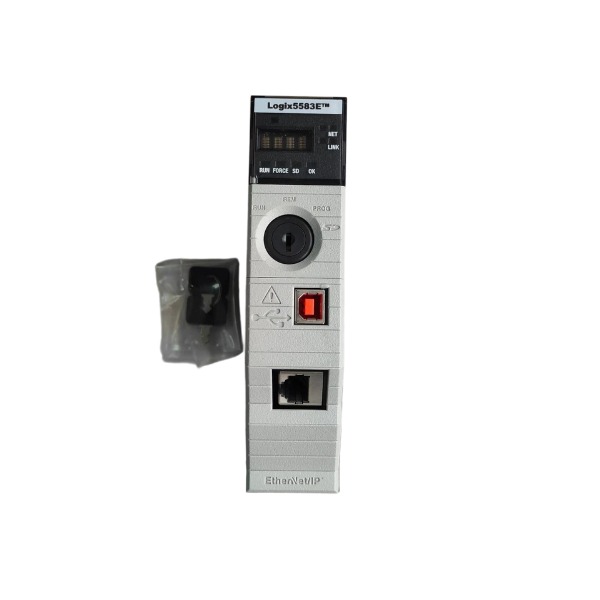







Description
-
BrandAllen‑Bradley
-
Model1756-L83E
-
Product NameControlLogix 5580 Programmable Automation Controller
-
Place of OriginUnited States
-
Customs HS Code8537101190
-
Power Supply5.1 V DC and 1.2 V DC
-
Dimensions170 mm × 120 mm × 140 mm
-
Weight0.394 kg
-
Operating Temperature0 ℃ ~ +60 ℃
-
Storage Temperature‑40 ℃ ~ +85 ℃
-
Warranty12 month
-
Product StatusBrand new
1756-L83E Installation Steps
Pre-Installation Preparation
Prior to installation, power down the 1756 ControlLogix chassis and disconnect backplane power.
Implement ESD protection: touch a grounded metal surface or wear an anti-static wrist strap to dissipate static charge. Avoid direct contact with the gold-plated backplane connector contacts.
Confirm the chassis power budget can satisfy the 1756-L83E current draw (5 mA @1.2 VDC, 1.20 A @5.1 VDC) to prevent insufficient power supply.
Remove the controller from its anti-static protective packaging.
Physical Module Mounting
Align the upper and lower edges of the 1756-L83E with the guide rails of an empty chassis slot.
Push the controller horizontally into the slot until a firm click is heard, ensuring complete engagement with the chassis backplane connector.
Verify the module front panel sits flush alongside neighboring modules and that the locking tabs are fully secured.
(Optional SD-Card Installation) Open the front key-switch cover. Insert the SD memory card in the proper orientation until it locks into place, then close the cover.
Set the unit key switch to the PROG position.
Cable Connection
USB Programming Port: Connect a Type-B USB cable between the front-panel USB port and the configuration laptop for firmware upgrades, project downloads and on-site diagnostics.
EtherNet/IP Port: Utilize industrial shielded CAT5e or CAT6 Ethernet cable to link the 1 Gbps EtherNet/IP RJ45 port on the front panel to an industrial switch or HMI equipment.
No separate external power wiring is needed; the controller is powered exclusively through the chassis backplane.
Power-on and Initial Commissioning
Perform a full inspection of mechanical assembly and cabling to ensure no loose connections exist.
Restore power to the chassis and monitor the OK LED for the controller self-diagnostic routine.
Open Studio 5000 Logix Designer (Version V30 or newer is required) on the configuration laptop.
Configure the controller IP address using the BOOTP-DHCP utility or static manual IP setup.
Where necessary, load the correct firmware version via ControlFLASH Plus software.
Download the control project to the controller. Troubleshoot active faults by referencing the four-character status codes shown on the front-panel display.
Once no faults are present, switch the key to RUN mode for regular operational use.

1756-L83E Controller Functions
The 1756-L83E belongs to Rockwell Automation ControlLogix 5580 controller family. It is engineered for high-performance industrial automation covering discrete, process, motion and safety-oriented control scenarios.
Core Control Functions
Runs multiple programming languages: ladder logic, function block diagram, structured text, sequential function chart and sequential control logic.
Implements multi-task operation mechanism, including continuous, periodic and event-triggered tasks to satisfy diverse response-time demands.
Handles high-speed digital and analog signal processing, well-suited for large-scale I/O application systems.
Delivers dedicated motion control instructions to operate Kinetix servo drives through the EtherNet/IP network.
Communication Functions
Equipped with dual integrated 1 Gbps EtherNet/IP ports, supporting DLR (Device Level Ring) for resilient redundant network architecture.
Establishes data links with remote I/O, HMIs, variable-frequency drives, servo units and third-party EtherNet/IP-compliant devices.
Interacts with local 1756 chassis I/O modules over the ControlLogix backplane bus.
Enables peer-to-peer data interchange among ControlLogix and CompactLogix controller families.

Data and Storage Functions
Embedded onboard memory stores user programs, tag variables and recipe datasets.
SD memory card slot supports program backup, firmware upgrade and on-board data logging.
Native USB Type-B interface serves for local programming, field diagnostics and firmware download.
Diagnostic and Security Functions
Performs real-time self-diagnostics on controller hardware, backplane-resident modules and network links.
Front-panel 4-character display plus LED status indicators present operational states and fault diagnostic codes.
Features access-control security, user-role permission management and user-program protection functions.
Maintains event logs to capture faults, alarm triggers and system operational history.
System Compatibility
Compatible with 1756-series ControlLogix racks, power supplies and I/O modules.
Configuration and application programming completed within Studio 5000 Logix Designer environment.
Supports hot-swap of chassis I/O modules without stopping controller runtime.
Allows dual-controller redundant deployment to realize high-availability automation systems.

6181P-17A3MWX1DC
1797-PS2N2
1756-PA50
1756-L81E
XM-161 1440-VDRS06-06RH
1440-DYN02-01RJ
SST-PFB3-CLX-RLL
MPL-B4530K-MJ72AA
6181P-17TSXP
6181P-12A2MW71DC
2711P-T12W22D9P
80026-520-01-R







