





.jpg)
587AEA64EBBA4FAE95ADD49AFB9BB882.jpg)







Description
-
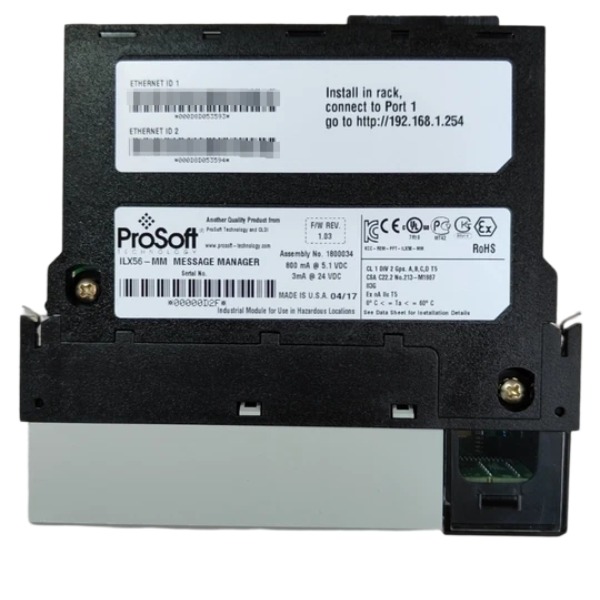
BrandProSoft
-
ModelILX56-MM
-
Product NameControlLogix inRAx Message Manager Module
-
Place of OriginUnited States
-
Customs HS Code853890
-
Power Supply5 V DC and 24 V DC
-
Dimensions120 mm × 35 mm × 140 mm
-
Weight0.32 kg
-
Operating Temperature0℃ ~ +60℃
-
Storage Temperature-40℃ ~ +80℃
-
Warranty12 month
-
Product Statusnew and original
Application Scenarios of ProSoft ILX56-MM
The ILX56-MM is an in-chassis Message Manager module designed for the Rockwell ControlLogix 1756 rack. It executes multi-protocol message-driven data exchange independently and relieves the communication burden of the ControlLogix CPU.
Heterogeneous PLC interconnection on production lines
It enables data exchange between ControlLogix and third-party controllers such as Siemens S7, Schneider Quantum, CompactLogix, MicroLogix, PLC-5 and SLC500. It is well suited for automotive, packaging and material handling production lines equipped with multi-brand OEM equipment. Data transmission can be configured without altering the source code of OEM controllers.
Legacy system retrofit and data migration
It connects legacy PLC-5, SLC500 controllers and Modbus TCP field instruments to new ControlLogix PAC platforms. Existing field devices can upload data to modern SCADA systems without full control system replacement. This solution is widely used in water treatment, wastewater treatment and metallurgy renovation projects.
Centralized data aggregation for multi-unit process plants
It collects data from distributed skids, remote field controllers and Modbus TCP transmitters in oil & gas, auxiliary power and chemical process applications. Multi-source process data is consolidated into ControlLogix for unified monitoring and interlock control.
Data bridge between control layer and upper management systems
It retrieves production parameters, equipment status and fault information from the ControlLogix system and forwards the data to MES, ERP or historian databases. It acts as an intermediate gateway to segregate the production control network from the office IT network.
Offload heavy message communication tasks from ControlLogix CPU
All cross-controller message configurations are hosted on the ILX56-MM, eliminating the need for extensive ladder MSG instructions in the Logix controller. This reduces CPU loading and prevents performance degradation triggered by frequent Ethernet message communications.
Multi-device data collection for factory centralized monitoring
The module supports concurrent communication with up to 16 remote controllers. It applies to multi-station assembly lines and multi-cell manufacturing systems to synchronize production states, counter values and fault signals among separate machine islands.
Plant network integration for mixed-protocol field instruments
It performs read and write operations for Modbus TCP flow meters, pressure transmitters, drives and analyzers, and maps the acquired data to ControlLogix tags. It greatly simplifies system integration when large quantities of Modbus field devices are connected to Rockwell PAC systems.

Hardware Installation & Network Preparation
Insert the ILX56-MM into an empty slot of the ControlLogix 1756 rack and connect Ethernet cables to its dual RJ45 ports. Configure the PC IP address to reside within the same subnet as the module. Access the embedded web configuration page through a web browser; the default login credential is admin / admin. Navigate to Administration > Network tab to assign static IP, subnet mask and gateway for Port1 and Port2. Save the parameters and re-establish the network connection.
Create Communication Interfaces
Launch the Configuration Editor and create individual interfaces for each target controller. Select the corresponding protocol type, including ControlLogix, Siemens S7 Industrial Ethernet, Modbus TCP, MicroLogix, PLC-5 and SLC500. Enter the remote controller’s IP address, rack/slot or node address. Browse and import the tag or register list of remote devices, and define local ControlLogix tags for data mapping. A maximum of 16 remote controller interfaces can be configured.
Build Transfer List & Define Transfer Rules
Expand the Transfer Lists node and click New to add transfer entries. Select the source and destination from the created interfaces: the source can be a local ControlLogix tag or a remote PLC register, while the destination is the opposite end. Configure transfer attributes such as sequence number, wait flag, Transfer-on-Change or periodic trigger mode.
Periodic transfer: cyclic read and write operations at fixed intervals
Transfer on Change: data transmission is triggered only when the source value changes
Match data types (BOOL, INT, DINT, REAL) to prevent format incompatibility.
Configure Transfer Execution Logic
Set the transfer sequence to specify the execution order of multiple transfer entries. Activate the "Wait" option if subsequent transfers need to wait for the completion of preceding ones. Set retry times and timeout values for each transfer item. Define fault handling actions: halt a single transfer or suspend the entire transfer list once communication failure occurs.
Download Configuration & Activate Transfers
Save the project configuration to the module’s CF card. Switch the module mode from IDLE to RUN to enable all transfer tasks. The module independently performs message read and write operations, requiring no ladder MSG instructions programmed in the ControlLogix CPU.
Online Monitoring & Fault Diagnosis
Access the web monitoring page to inspect transfer status, data values, message counters and error codes. Check read/write packet statistics and failure logs. Troubleshoot issues such as communication timeout, invalid tags, connection rejection or register access errors. Adjust interface parameters or transfer mapping rules if data fails to refresh properly.
ControlLogix Side Tag Handling
Define matching tags within the ControlLogix controller. The ILX56-MM exchanges tag data via the backplane, so no MSG instruction programming is needed in the Logix program. Add status tags to retrieve module heartbeat signals, transfer fault flags and communication health bits for PLC alarm logic development.

FAQ for ProSoft ILX56-MM
Q: What is the difference between ILX56-MM and ProSoft external Modbus gateways?
A: ILX56-MM is an in-chassis module that plugs into the Logix backplane; external gateways are standalone units connected via Ethernet or serial ports. ILX56-MM offers tighter PLC integration.
Q: Can ILX56-MM work with third-party Modbus devices?
A: Yes, it can communicate with most standard Modbus RTU and Modbus TCP slave devices from different manufacturers.
Q: Can you offer remote technical support for ILX56-MM configuration?
A: Our automation technical team can provide remote guidance for hardware installation, PCB software setup and data mapping troubleshooting.
Q: Can I order a sample ILX56-MM for lab testing?
A: Sample supply is available subject to stock status. Please send your project details for sample quotation.

MVI56E-MCM
MVI46-MCM
RLX2-IHNF
PTQ-PDPS
RLX2-IFH24E
PLX51-HART-4I
6104-WA-PDPM
MVI94-MCM
MVI56E-SIE



.jpg)

.jpg)







