.jpg)
D7A11B7D2A374ECBB5527388D212A66A.jpg)
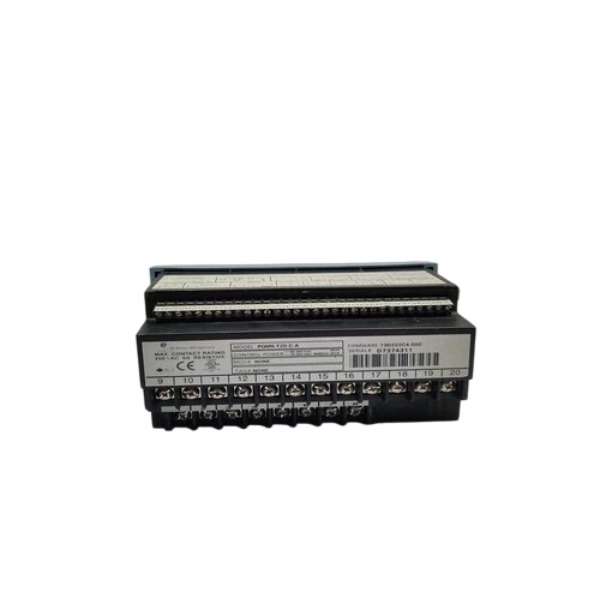







Description
-
BrandGE
-
ModelPQMII-T20-C-A
-
Product NamePQMII-T20-C-A Power Quality Meter
-
Place of OriginUnited States
-
Customs HS Code902830
-
Power Supply20–60 VDC or 20–48 VAC, 50/60Hz
-
Dimensions144 mm × 144 mm × 104 mm
-
Weight1.37 kg
-
Operating Temperature-20℃ ~ +60℃
-
Storage Temperature-40℃ ~ +85℃
-
Warranty12 month
-
Product Statusnew
Troubleshooting for GE PQMII-T20-C-A
Pre-check & Safety Preparation
Perform lockout-tagout and isolate the power circuit prior to inspection. Ensure the CT/PT secondary wiring is properly shorted and grounded to prevent high-voltage hazards. Check the meter installation and tighten loose terminals. Prepare a multimeter, CT/PT test tools and the EnerVista PQMII configuration software for diagnostic work.
Control Power Inspection
Measure the auxiliary supply voltage of the PQMII-T20-C-A and confirm it lies within the 70~265V AC /90~300V DC range. Inspect for loose terminals, voltage fluctuations and ripples. Inadequate or unstable control power can result in a blank screen, random resets or frozen measurements. Verify the power source has sufficient capacity and appropriate fuse protection.
Voltage & Current Input Circuit Inspection
Examine three-phase voltage and CT secondary wiring. Confirm the configured PT/CT ratio matches hardware parameters. Check CT wiring for open circuits, short circuits or reversed polarity and validate the phase sequence. Improper wiring leads to inaccurate readings, unbalance alarms or false power-quality events. Watch out for CT open-circuit risks during maintenance operations.
Display & Measurement Abnormality Troubleshooting
If the screen fails to illuminate, recheck the auxiliary power and terminal connections. If values appear on the display but measurements are inaccurate, verify PT/CT parameters, wiring polarity and phase sequence. Use EnerVista to compare real-time measured values. If readings drift on a single phase, inspect the corresponding voltage or CT loop.
Communication Fault Diagnosis
The PQMII-T20-C-A adopts RS485 Modbus RTU and DNP3.0 protocols. Inspect RS485 cables and wiring terminals, and confirm baud rate, parity and device address settings. Check the termination resistor configuration on the bus. Look for bus overload, damaged cables or ground potential differences that distort signals. Test the connection via EnerVista. For intermittent communication, reduce bus load and separate communication cables from power cables.
Alarm & Event Log Analysis
Access the on-board event records and disturbance logs. Review alarms such as overvoltage, undervoltage, current unbalance, phase reversal and harmonic overload. Examine VDR sag/swell records and waveform capture data. Distinguish genuine power-system disturbances from false alarms triggered by improperly configured setpoints.
I/O Relay and Digital Input Check
Test digital input status and relay output operation. Validate the 4 programmable switch inputs and 4 relay outputs. If relays cannot be actuated, check trigger setpoints, control power for the output loop and wiring continuity. Ensure relay contact ratings are compatible with external loads.
Environmental and Mechanical Inspection
Check cabinet ambient temperature, dust levels and vibration. This meter is designed for panel mounting inside switchgear. High temperature, heavy dust or severe vibration may trigger intermittent faults. Inspect the meter for burn marks, terminal corrosion or physical damage and maintain adequate cabinet ventilation.
Firmware and Configuration Verification
Connect through EnerVista to check the firmware version. Validate configuration parameters including PT/CT ratios, nominal voltage, alarm thresholds and communication settings. Back up the configuration before making modifications. Improper downloaded parameters will cause measurement errors or abnormal alarm behavior.
Swap Test for Fault Localization
Replace the PQMII-T20-C-A with a verified good spare unit. If the fault transfers to the new meter’s location, the root cause lies in field wiring, CT/PT or the power supply. If the fault disappears after replacement, the original meter is faulty. This method quickly differentiates meter hardware failure from faults in field circuits.
Common Fault Handling
No display: Check auxiliary power supply, blown fuse or loose power terminals.
Inaccurate power measurement: Incorrect PT/CT ratio, reversed CT polarity or wrong phase sequence.
Intermittent communication: Missing termination resistor, lengthy RS485 cable or EMI interference.
False power quality alarms: Improper alarm setpoints, CT saturation or transient noise on the power circuit.

Power supply
Auxiliary supply range: 70~265V AC / 90~300V DC, 50/60Hz
Nominal power consumption: 10 VA; maximum power consumption: 20 VA
Typical power hold-up: 100ms at 120V AC/DC
Voltage & current measurement inputs
Voltage input: configurable through PT ratio, rated up to 600V L-L
Current input: CT secondary with 5A or 1A selectable
Basic measurement accuracy (0~40°C):
Voltage: ±0.2% full scale
Current: ±0.2% full scale
kW, kvar, kVA: ±0.4% full scale
Voltage/current unbalance: ±1% full scale
Harmonic measurement
It supports harmonic analysis up to the 63rd order and calculates THD and TIF values. High-speed sampling enables transient waveform capture and disturbance recording.
Analog outputs (T20 option)
4 isolated analog output channels with 4~20mA / 0~20mA configurable
Maximum load resistance: 600Ω
Output accuracy: ±1% of full scale; 50V galvanic isolation
Digital I/O
4 programmable digital dry-contact inputs
4 Form-C relay alarm outputs (NO/NC silver alloy contacts)
Relay rating: continuous 5A carry, 30A for 0.2s; compatible with resistive and inductive loads
Communication interfaces
Front local RS232 port; dual rear RS485 serial ports
Supported protocols: Modbus RTU, DNP3.0
It supports time synchronization and user-defined Modbus memory mapping and is configured via EnerVista software.
Data recording & event storage
VDR (Voltage Disturbance Recorder): stores up to 500 sag/swell disturbance events
Event recorder: up to 150 events
Data logger: storage capacity for 98,000 logged records
Captures waveform snapshots during voltage sags, swells and transients
Mechanical & physical
Mounting: panel cutout installation for switchgear cabinets
Approximate weight: 2.3kg
Flash firmware upgradable via the communication port
Measured parameters
Measures three-phase V, I, kW, kvar, kVA, power factor, frequency, energy (kWh, kvarh), demand values, current/voltage unbalance, harmonics, voltage sags/swells and transient events.
Application functions
Features programmable threshold alarms for overvoltage, undervoltage, overcurrent, unbalance, over/under frequency and harmonic overload. Relay and analog output triggers can be assigned for alarm events.

FAQ of GE PQMII-T20-C-A
Q: What electrical parameters can GE PQMII-T20-C-A measure?
A: It measures V, I, kW, kVar, kVA, power factor, active/reactive energy, total harmonic distortion (THD), voltage sags, swells, interruptions and transient events.
Q: What communication options does GE PQMII-T20-C-A support?
A: It supports Modbus RTU, Modbus TCP, and other standard industrial communication interfaces for data transmission to SCADA and PLC systems.
Q: What is the rated voltage for GE PQMII-T20-C-A?
A: It is designed for three-phase power distribution systems. Please refer to the official datasheet for exact rated voltage and current input specifications.
Q: Does GE PQMII-T20-C-A have built-in data logging?
A: Yes, it has internal event and waveform recording storage, saving power quality disturbance logs for post-event analysis and reporting.

DS200TDAH1BHD
DS200TCRAG1ACC
DS200DTRAG1AAA
DS200DTBBG1ABB
DS200SDCCG4AFD
DS200TCDAG1BDB
IS220PTURH1B
C60G01HCHF8FH6PM8FP6PU6PWXX
DS200TCQCG1BHF


.jpg)

.jpg)
.jpg)