





9FD0DEF04EBF4665B57F929F6A995DED.jpg)
.jpg)







Description
-
BrandGE
-
ModelGRLY V2 GA200695
-
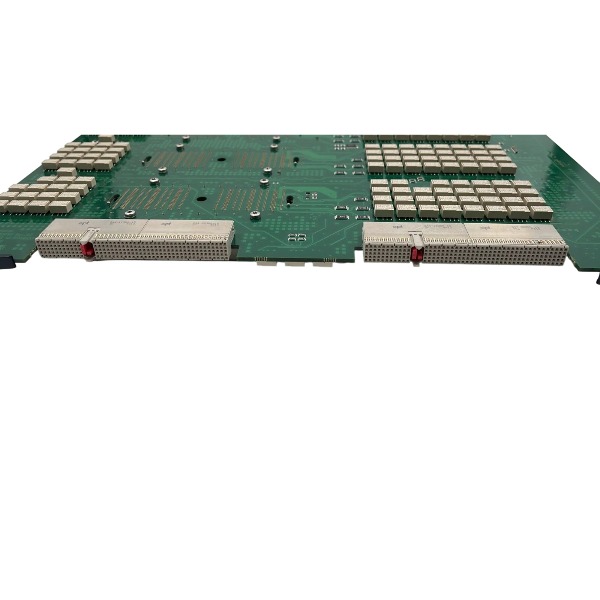
Product NameGecko Relay V2 Probe Selection Board
-
Place of OriginUnited States
-
Customs HS Code85423900
-
Power Supply12 V DC
-
Dimensions215 mm × 160 mm × 30 mm
-
Weight0.48 kg
-
Operating Temperature+10 °C to +40 °C
-
Storage Temperature-20 °C to +60 °C
-
Warranty12 month
-
Product Statusnew
Communication Cable Connection Procedure for GE GRLY V2 GA200695
Step 1 Identify Interface Definition
GA200695 (Gecko Relay V2) is equipped with a dedicated J3 onboard header for service communication, serving as the programming and diagnostic interface. The board exchanges data with the system main processor over a proprietary high-speed differential backplane bus. Regular operational communication is carried out via the mating backplane connector rather than J3. J3 is exclusively reserved for offline troubleshooting, firmware upgrading and fault diagnostics.
Step 2 Cable Connection Sequence
Ensure the whole system is completely powered off and the AC power cord is disconnected.
Locate the J3 programming header on the GRLY V2 circuit board.
Align the key notch of the communication plug with the mating cutout on J3, insert vertically and press softly until the connector locks. Never apply excessive force to prevent pin bending.
Connect the opposite end of the proprietary service cable to the GE service adapter.
Plug the service adapter into the USB port of the service laptop.
Recheck all mating joints to confirm full insertion and no loose connection.
Step 3 Shielding & Wiring Requirements
Only the original shielded communication cable can be used; standard jumper wires are not acceptable. The cable shield shall be bonded to the service adapter housing, with single-point grounding implemented at the adapter side. Route the communication cable away from high-voltage and pulse power cables inside the ultrasound chassis to minimize electromagnetic interference. Do not tie this diagnostic cable together with probe high-voltage cables.
Step 4 Power-up and Communication Verification
Partially refit the chassis cover and arrange the cable route to avoid pinching.
Reconnect AC mains power and start the Vivid E80/E90/E95 ultrasound system.
Open the official GE service diagnostic software on the service laptop.
Choose the correct communication port and establish connection to retrieve board revision, fault logs and status registers.
If communication cannot be established: cut off power, reseat both cable ends, and test pin continuity of the cable and J3 header.
Step 5 Disconnection Steps
Save logs or firmware files prior to disconnection. Power down the ultrasound unit, disconnect AC supply and wait for capacitor discharge. Pull out the cable from the J3 header steadily by gripping the plastic connector body, not the conductors. Refit the original dust cap onto J3 once testing is finished.

Pre-Diagnosis Preparation
Disconnect all power supplies to the module and allow a minimum 5-minute waiting period for full discharge of internal capacitors.
Get testing tools ready: multimeter, insulation tester, screwdriver, backplane adapter and communication cable.
Document LED indications, fault codes and on-site symptoms prior to disassembly.
Visually inspect the GA200695 for burn traces, corrosion, loose terminals or PCB cracks.
Step 1 Power Supply & Backplane Inspection
Restore power following official specifications and measure the input voltage at the module power terminals.
Confirm the measured voltage falls within the rated range and no excessive voltage drop occurs under load.
Examine backplane slot contacts for oxidation, bent pins or poor contact; re-seat the module securely.
Interpret power LED status: steady ON indicates normal power supply; OFF points to power circuit or backplane failure; flashing signals overvoltage, undervoltage or overcurrent lockout.
Step 2 LED Indication and Onboard Fault Code Retrieval
Read the front-panel status LED array of the GRLY V2.
Launch the compatible GE configuration software to retrieve diagnostic logs and fault registers.
Save active faults and historical fault entries; do not erase fault logs before backup is completed.
Typical fault types include communication breakdown, channel overload, internal hardware malfunction and configuration inconsistency.
Step 3 Communication Troubleshooting
Inspect bus wiring, termination resistor setting and single-point shield grounding.
Validate A/B bus polarity, and ensure no A-to-ground short or A-B short-circuit.
Match the module station address, baud rate and communication parameters against the master station settings.
Swap with a confirmed good spare module to isolate the fault source between the module itself and the bus/master controller.
Step 4 Channel I/O Circuit Test (Power Removed)
Test every channel with a multimeter set to resistance or continuity mode.
For output channels: confirm open/close actions follow control commands and detect any internal short circuit.
For input channels: check signal feedback while applying external trigger signals.
Test for leakage current, short-to-ground faults and cross-channel shorting.
Step 5 Loaded Functional Bench Test
Mount the GA200695 onto a test backplane fitted with standard loads.
Download the matching configuration file and execute a cold restart.
Actuate each channel sequentially while monitoring feedback signals and status registers.
Check for unexpected response latency, signal chattering and false tripping.
Simulate overcurrent and overvoltage scenarios to validate protective functions.
Step 6 Fault Isolation by Cross Comparison
Substitute the GRLY V2 with an identical spare module in the same slot.
If the fault vanishes: the original GA200695 has a hardware defect.
If the fault persists: the issue resides in the backplane, field wiring, master logic or external loads.
Step 7 Post-Diagnosis Verification
Run an extended continuous test for no less than 30 minutes after replacement or repair.
Verify no repeated alarms, stable communication and proper operation of all channels.
Store the updated diagnostic log and finalize the test report.

FAQ for GE GRLY V2 GA200695 Relay Module
Q: What is GE GRLY V2 GA200695?
A: GE GRLY V2 GA200695 is a relay output module used for industrial control and protection systems. It provides relay contact switching signals to trigger alarms, circuit tripping and auxiliary control actions.
Q: What industries and systems use GE GRLY V2 GA200695?
A: It is commonly deployed in power generation, power distribution, oil & gas, and factory automation, matched with GE protection and control systems for auxiliary signal output and status indication.
Q: What is the function of GRLY V2 version compared with older GRLY models?
A: GRLY V2 is the upgraded version of the original GRLY module. It optimizes contact capacity, anti-interference performance and firmware, improves long-term stability, and fixes known compatibility issues of the old version.
Q: Is GE GRLY V2 GA200695 plug-and-play for replacement?
A: Physical installation size is consistent with the previous GRLY series, but you need to confirm system firmware version and parameter configuration before replacement to avoid communication mismatch.
Q: What contact type does GE GRLY V2 GA200695 support?
A: It comes with dry relay contacts, suitable for low-power signal switching. Do not exceed the rated voltage and current of the contacts to prevent contact burnout.

DS200TDAH1BHD
DS200TCRAG1ACC
DS200DTRAG1AAA
DS200DTBBG1ABB
DS200SDCCG4AFD
DS200TCDAG1BDB
IS220PTURH1B
C60G01HCHF8FH6PM8FP6PU6PWXX
DS200TCQCG1BHF


.jpg)

.jpg)
.jpg)
.jpg)







