





.jpg)
BBBADD019E1B4BDCA9251F61E568FF9A.jpg)
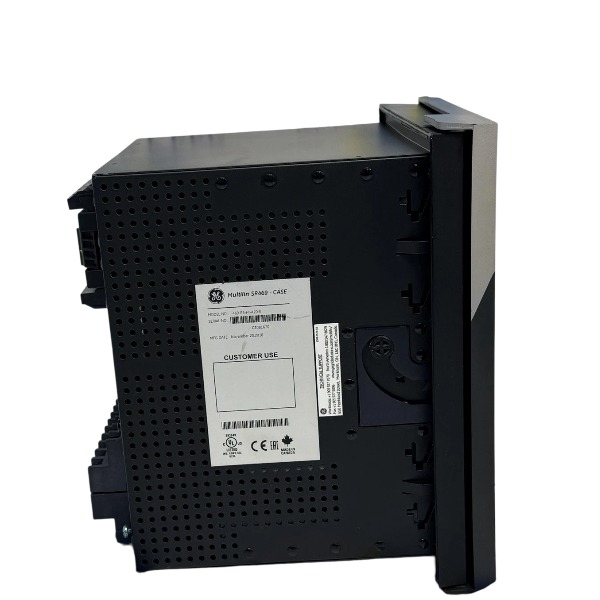







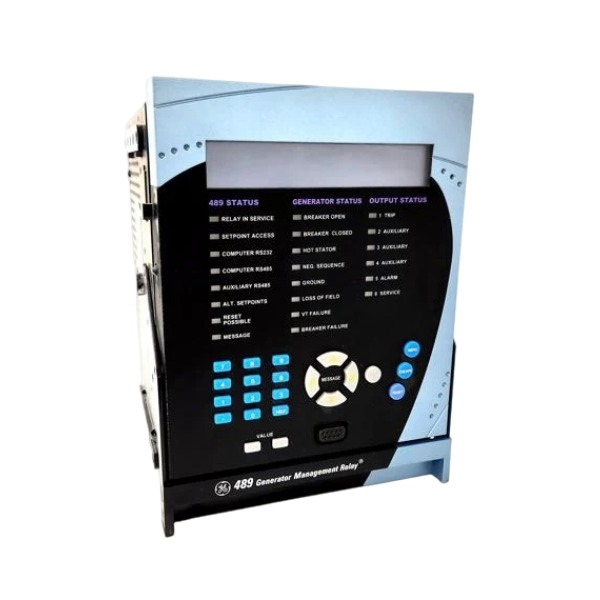
Description
-
BrandGE
-
Model469-P5-HI-A20-E-H
-
Product NameGenerator Management Relay
-
Place of OriginUnited States
-
Customs HS Code8536300000
-
Power Supply90–300 VDC / 70–265 VAC, 48–62 Hz
-
Dimensions144 mm × 144 mm × 112 mm
-
Weight1.8 kg
-
Operating Temperature-20 °C to +70 °C
-
Storage Temperature-40 °C to +85 °C
-
Warranty12 month
-
Product Statusnew
How to Interpret the Relay's Self-test Results
This guidance is for the GE 469-P5-HI-A20-E-H motor management relay.
SERVICE LED off
Self-test passed. All internal hardware, memory, measurement circuits and power supply of the GE 469-P5-HI-A20-E-H work normally. The relay is ready for protection and monitoring.
SERVICE LED steady ON
Self-test failed. It points to internal hardware fault, power supply abnormality, CT open circuit or memory corruption inside the GE 469-P5-HI-A20-E-H. The relay may not perform protection functions reliably. Stop operation and carry out troubleshooting right away.
SERVICE LED flashing
Minor warning or non-critical self-test alert. The protection functions of the GE 469-P5-HI-A20-E-H remain available. Check event logs for clues including communication port failure, RTD open circuit or setting checksum warning.
LCD self-test message on power-up
“PASS”: Self-test of the GE 469-P5-HI-A20-E-H completed successfully.
Specific error codes / component failure prompts: Locate faulty modules (A/D, RAM, flash, clock, power circuit) according to the corresponding code definitions.
Self-test log checking
Access the relay menu or connect EnerVista software to retrieve self-test records of the GE 469-P5-HI-A20-E-H. The logs include timestamp, fault item and fault description to support further analysis.

Pre-operation Check
Confirm the relay model, 5A CT rating, auxiliary power range and conformal coating version prior to power-up. Verify CT, PT, RTD, digital input, relay output and communication wiring complies with drawings, and check CT polarity to prevent reverse connection.
Ensure all secondary circuits are isolated, temporary shorting grounds removed, and cabinet PE grounding is secure.
Confirm the draw-out module is fully seated and locked.
Power-on and Self-test
Apply auxiliary control power (70–265 VAC / 90–300 VDC).
The relay initiates automatic self-diagnosis. A dark SERVICE LED indicates a successful self-test; a continuously lit SERVICE LED points to internal failure or power supply abnormality.
Check the front-panel LCD and status LEDs to confirm no active alarms or trip signals.
Local Operation via Front Panel
Menu navigation: Press MENU to open the main menu, use arrow keys to toggle pages, ENTER to confirm, MESSAGE to view alarm/trip logs, and ESC to return to the upper menu.
View measurements: Enter Actual Values to read three-phase current, voltage, power, power factor, RTD temperature, start counter and runtime.
Setpoint configuration: Go to Settings and enter the password to unlock edits. Configure motor rated current, thermal overload curve, locked rotor, jam, phase unbalance, ground fault, over/under voltage, over/under frequency and RTD alarm/trip thresholds.
Review trip records: Access Targets to retrieve fault type, fault magnitude and timestamp after a trip.
Manual test: Built-in element test and waveform simulation support commissioning without external test equipment.
Commissioning and Parameter Configuration via EnerVista 469 Software
Connect a PC to the relay over RS232, RS485 or Ethernet.
Create or open a setting file, enter motor nameplate data, enable required protection functions and map digital inputs and output relays.
Configure communication parameters: Modbus RTU / Modbus TCP, baud rate, station address and IP address.
Download settings to the relay and save the final setting file for archiving.
Retrieve real-time measurements, trend logs and fault oscillography from the relay.
Normal Running Operation
Reset all latched alarms and trip signals after setting validation.
Start the motor and monitor inrush current, start duration and temperature rise, and verify proper protection response.
Real-time monitoring: Read operating data locally or remotely via SCADA/DCS; monitor start inhibition, alarms and pre-trip warnings.
The relay provides start inhibit logic to avoid frequent motor cycling.
Trip, Alarm and Reset Operation
Upon tripping: The TRIP LED illuminates and relay contacts change state. Locate the root cause using Target records and oscillography.
Reset options: Local reset via the front-panel RESET button; remote reset via digital input or software command. Latched faults require manual reset.
Alarms do not trigger motor tripping; clear alarms once the fault is resolved.
Maintenance and Draw-out Operation
Disconnect control power and motor secondary circuits before extracting the relay.
Release the draw-out latch and pull out the main unit. The base and secondary wiring remain intact with no disconnection required.
Replace or test the relay, reinsert and lock it securely. Restore power and validate communication and protection functions.
Communication Operation
Dual serial ports plus Ethernet interface support connection to PLC, DCS and SCADA systems.
Supported protocols: Modbus RTU, Modbus TCP. It transmits metering values, alarms, fault targets and event logs.
Configure correct IP and station addresses; separate signal cables from high-power drive wiring to reduce EMC interference.
Shutdown and Decommissioning
Stop the motor first before disabling protection if necessary.
Cut the relay auxiliary power and CT/PT secondary circuits.
Lock the setting password to prevent unauthorized parameter changes.

FAQ for GE 469-P5-HI-A20-E-H Multilin Motor Management Relay
Q: What is GE 469-P5-HI-A20-E-H?
A: The GE 469-P5-HI-A20-E-H is a Multilin 469 series motor management relay. It offers full protection, control, metering and fault recording for medium-voltage motors. The suffix H stands for conformal coating, suitable for humid and corrosive environments.
Q: What protection functions does the 469-P5-HI-A20-E-H provide?
A: It supports thermal overload, locked rotor, phase unbalance, ground fault, overcurrent, undervoltage, overvoltage, underfrequency, overfrequency, RTD temperature monitoring and breaker failure protection.
Q: What communication protocols does GE 469-P5-HI-A20-E-H support?
A: It supports Modbus TCP, Modbus RTU and DNP3. It can connect to SCADA, DCS and HMI systems for remote monitoring and data acquisition.
Q: What software is used to configure the 469-P5-HI-A20-E-H?
A: Configuration, parameter setting, fault waveform analysis and firmware upgrade are completed via GE EnerVista software.
Q: What does each suffix mean for 469-P5-HI-A20-E-H?
A: P5 = 5A CT input; HI = high impedance control power; A20 = 4-20mA analog output; E = Ethernet port; H = conformal coated version.
Q: What are the typical application scenarios of 469-P5-HI-A20-E-H?
A: Widely used in pumps, fans, compressors and conveyors for oil & gas, chemical plants, mining, water treatment and power station auxiliary motors.

DS200TDAH1BHD
DS200TCRAG1ACC
DS200DTRAG1AAA
DS200DTBBG1ABB
DS200SDCCG4AFD
DS200TCDAG1BDB
IS220PTURH1B
C60G01HCHF8FH6PM8FP6PU6PWXX
DS200TCQCG1BHF



_.jpg)
.jpg)
.jpg)







