





3B46182D0505458CB705952E5343DAD4.jpg)
.jpg)
.jpg)
.jpg)







Description
-
BrandAllen-Bradley
-
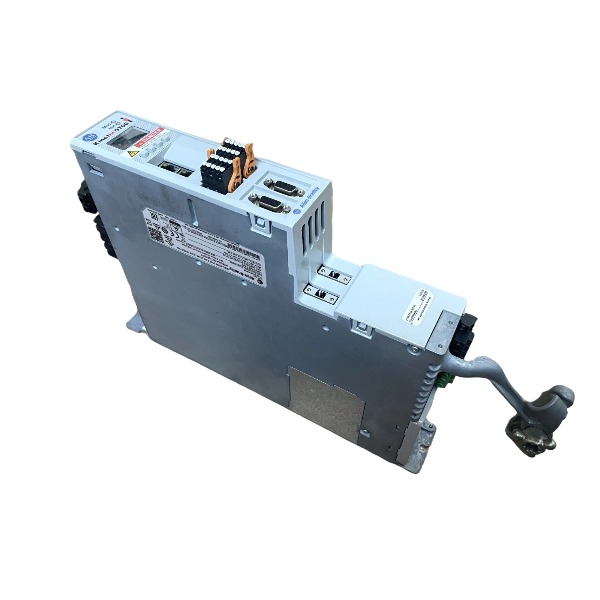
Model1715-AENTR
-
Product Name1715 EtherNet/IP Redundant I/O Communication Adapter
-
Place of OriginUnited States
-
Customs HS Code85389000
-
Power Supply18 V DC to 32 V DC
-
Dimensions166 mm × 42 mm × 118 mm
-
Weight0.42 kg
-
Operating Temperature-20°C to +60°C
-
Storage Temperature-40°C to +85°C
-
Warranty12 month
-
Product Statusnew
Fault Diagnosis Methods for Allen-Bradley 1715-AENTR Redundant I/O Adapter
Review front-panel LED indicators to identify faults related to the module, network, rack and I/O channels.
Check the stability of the 24V DC power supply, and inspect redundant power cables and terminal screw tightness.
Examine Ethernet cables, connectors and switch ports for physical damage, loose contacts or network congestion.
Retrieve major and minor fault codes as well as adapter diagnostic tags through Studio5000 and RSLinx.
Validate electronic keying settings to ensure consistency between offline configuration and physical hardware revisions.
Confirm static IP address, subnet mask and gateway, and check whether IP settings get lost after a power cycle.
Inspect the backplane connection between the 1715-AENTR and neighboring 1715-series I/O modules.
Diagnose individual I/O channel failures, including field wiring short circuits, overvoltage conditions and blown fuses.
Test the redundancy switchover feature and monitor the operational health of the standby paired adapter.
Confirm firmware compatibility; perform firmware upgrades to fix known defects and unexpected SED faults.
Inspect grounding and EMC arrangements to rule out intermittent communication failures caused by electrical interference.
Apply a power cycle to clear minor faults, then download the matching project configuration after fault reset.
Isolate I/O modules sequentially to determine whether the fault originates from the adapter or downstream I/O devices.
Recheck SIL configuration consistency whenever IP parameters are adjusted to prevent configuration mismatch faults.

Launch Studio 5000 Logix Designer and open your ControlLogix redundant project.
Add the 1715-AENTR redundant adapter set to the I/O tree (Slot 0 for Primary A, Slot 1 for Secondary B).
Double-click the 1715-AENTR adapter to bring up the Module Properties dialog.
Switch to the Electronic Keying tab, where three operating modes are provided: Exact Match, Compatible Module, and Disable Keying.
Choose Exact Match: the system performs strict validation of vendor, device type, product code, as well as major and minor firmware revisions.
Choose Compatible Module: it only validates vendor, device type and product code, permitting replacement with modules of different minor firmware revisions.
Choose Disable Keying: all keying validation will be bypassed (not advised for SIL safety implementations).
Make sure the catalog number, series and firmware revision align with the physical 1715-AENTR hardware.
Save the module parameters and download the revised project to the Logix controller.
Connect to the target network using RSLinx Classic, then verify the online identity and firmware version of the adapter.
Keep track of controller fault tags; clear the keying mismatch fault (16#0116) if any version discrepancy is detected.
Upgrade the adapter firmware through ControlFLASH when the configured revision does not match the physical hardware.
Run redundancy switchover tests after finishing keying setup to ensure both A and B adapters can communicate reliably.
Keep Exact Match enabled for SIL2 safety systems to avoid installation of incorrect replacement modules.

FAQ for Allen-Bradley 1715-AENTR EtherNet/IP Adapter Module
Q: What is Allen-Bradley 1715-AENTR?
A: The Allen-Bradley 1715-AENTR is a fault-tolerant EtherNet/IP communication adapter for the 1715 redundant I/O system, designed to deliver high-availability redundant I/O communication for critical automation control systems.
Q: What backplane does 1715-AENTR use?
A: It pairs with the 1715-A2A dual adapter base unit. Two 1715-AENTR adapters can be installed on one 1715-A2A base to build redundant communication links.
Q: Which PLC controllers are compatible with 1715-AENTR?
A: It works with Allen-Bradley ControlLogix and GuardLogix controllers supporting EtherNet/IP, configured via Rockwell Studio 5000 Logix Designer software.
Q: What I/O modules can work with 1715-AENTR?
A: It supports the full 1715 series I/O modules, including 1715-IB16D, 1715-OB8DE, 1715-IF16, 1715-OF8I and corresponding termination assemblies.
Q: Does 1715-AENTR support hot swap?
A: Yes, the 1715-AENTR adapter supports hot-swap replacement in redundant configuration, without stopping the whole I/O system during maintenance.
Q: What are the typical applications of 1715-AENTR?
A: It is widely used in oil & gas, power generation, chemical processing, water treatment and other industries requiring zero downtime for process control.

6181P-17A3MWX1DC
1797-PS2N2
1756-PA50
1756-L81E
XM-161 1440-VDRS06-06RH
1440-DYN02-01RJ
SST-PFB3-CLX-RLL
MPL-B4530K-MJ72AA
6181P-17TSXP
6181P-12A2MW71DC
2711P-T12W22D9P
80026-520-01-R


.jpg)

.jpg)
.jpg)







